yes the SKU-Dis08070H
OK so what is when I had this I had the demo on it brand new, I tried to set it up and it went blank. Ever since I can get the back light to come it seems to be blue That is absolutely all I get. But if I hook it hook it up to my laptop everything's there. And I don't believe I have the factory framework. And thank you for responding back. Ever since I took the demo I have had zero luck with anything to perform on the ESP32 itself 7 inch
@james251 said:
yes the SKU-Dis08070H
OK so what is when I had this I had the demo on it brand new, I tried to set it up and it went blank. Ever since I can get the back light to come it seems to be blue That is absolutely all I get. But if I hook it hook it up to my laptop everything's there. And I don't believe I have the factory framework. And thank you for responding back. Ever since I took the demo I have had zero luck with anything to perform on the ESP32 itself 7 inch
Hello,
I’m working with a CrowPanel 7.0 HMI ESP32-S3 unit and I want to confirm I’m following the correct factory restore / flashing process.
I successfully downloaded the package labeled hmi7.0-factory-firmware-3.0, but the contents appear to be Arduino source code (example → Arduino → arduino_code) rather than precompiled .bin firmware files.
Before proceeding further, I just want to confirm:
Is the intended factory restore method to open the provided Arduino .ino project and upload it via Arduino IDE to the ESP32-S3?
Or is there a separate set of factory .bin firmware files intended to be flashed using the ESP32 Flash Download Tool?
Right now I can see and open the Arduino source correctly, but I want to be sure I’m restoring the panel exactly as intended for my specific SKU before flashing.
If there is a recommended board profile, partition scheme, or specific Arduino settings for this panel, please let me know.
Thank you for your help — I appreciate it.
Best regards,
James Hart
If the ESP32 V3.0 touchscreen or Lesson 4 touch code fails, upload the provided fix code and make sure you are using ESP32 core version 2.0.x, since touch may not work correctly on 3.0+.
@james251 said:
Hello,
I’m working with a CrowPanel 7.0 HMI ESP32-S3 unit and I want to confirm I’m following the correct factory restore / flashing process.
I successfully downloaded the package labeled hmi7.0-factory-firmware-3.0, but the contents appear to be Arduino source code (example → Arduino → arduino_code) rather than precompiled .bin firmware files.
Before proceeding further, I just want to confirm:
Is the intended factory restore method to open the provided Arduino .ino project and upload it via Arduino IDE to the ESP32-S3?
Or is there a separate set of factory .bin firmware files intended to be flashed using the ESP32 Flash Download Tool?
Right now I can see and open the Arduino source correctly, but I want to be sure I’m restoring the panel exactly as intended for my specific SKU before flashing.
If there is a recommended board profile, partition scheme, or specific Arduino settings for this panel, please let me know.
Thank you for your help — I appreciate it.
Best regards,
James Hart
If you only have the backlight and no display or touch response, first flash the factory firmware to rule out a hardware fault. If it works after that, the issue is likely library or firmware related.
Also confirm you are using ESP32 board package 2.0.x, since newer versions often break touch drivers. Check the ribbon cable connection as well, a loose cable can cause the same symptom.
If the problem remains, share your exact board model, Arduino IDE version, and library versions so others can help troubleshoot more accurately.


Comments
yes the SKU-Dis08070H
OK so what is when I had this I had the demo on it brand new, I tried to set it up and it went blank. Ever since I can get the back light to come it seems to be blue That is absolutely all I get. But if I hook it hook it up to my laptop everything's there. And I don't believe I have the factory framework. And thank you for responding back. Ever since I took the demo I have had zero luck with anything to perform on the ESP32 itself 7 inch
Hi James,
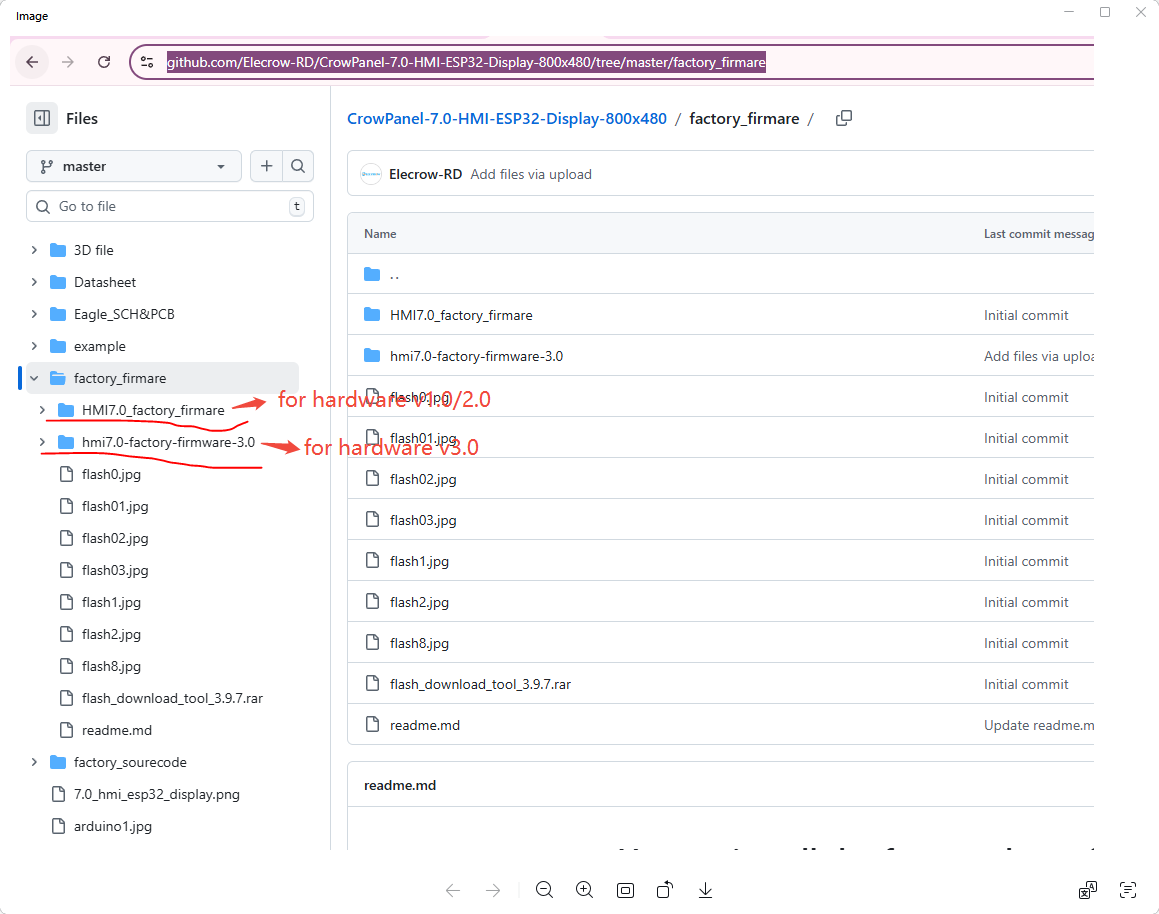
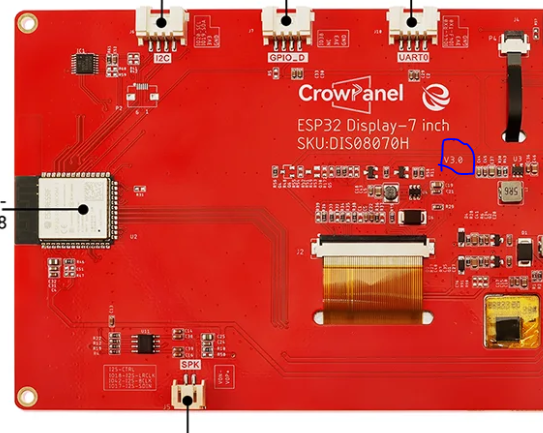
This is the factory firmware: Pls choose the factory firmware according to the hardware version of your device.(It is on the back of the board.)
https://github.com/Elecrow-RD/CrowPanel-7.0-HMI-ESP32-Display-800x480/tree/master/factory_firmare
An example of a hardware version of HMI devices :
Hello,
I’m working with a CrowPanel 7.0 HMI ESP32-S3 unit and I want to confirm I’m following the correct factory restore / flashing process.
I successfully downloaded the package labeled hmi7.0-factory-firmware-3.0, but the contents appear to be Arduino source code (example → Arduino → arduino_code) rather than precompiled .bin firmware files.
Before proceeding further, I just want to confirm:
Is the intended factory restore method to open the provided Arduino .ino project and upload it via Arduino IDE to the ESP32-S3?
Or is there a separate set of factory .bin firmware files intended to be flashed using the ESP32 Flash Download Tool?
Right now I can see and open the Arduino source correctly, but I want to be sure I’m restoring the panel exactly as intended for my specific SKU before flashing.
If there is a recommended board profile, partition scheme, or specific Arduino settings for this panel, please let me know.
Thank you for your help — I appreciate it.
Best regards,
James Hart
If the ESP32 V3.0 touchscreen or Lesson 4 touch code fails, upload the provided fix code and make sure you are using ESP32 core version 2.0.x, since touch may not work correctly on 3.0+.
Dear James,
The link I provided earlier contains .bin files; please take a look. It also includes instructions. Just follow those steps.
https://github.com/Elecrow-RD/CrowPanel-7.0-HMI-ESP32-Display-800x480/tree/master/factory_firmare
Thanks, Best regards,
If you only have the backlight and no display or touch response, first flash the factory firmware to rule out a hardware fault. If it works after that, the issue is likely library or firmware related.
Also confirm you are using ESP32 board package 2.0.x, since newer versions often break touch drivers. Check the ribbon cable connection as well, a loose cable can cause the same symptom.
If the problem remains, share your exact board model, Arduino IDE version, and library versions so others can help troubleshoot more accurately.
Discussion on InfinityLab - Smart AI Tools, Image & Text Utilities, QR, OCR App (Kotlin + AdMob + AppLovin)