Touch function of Crowpanel 7 esp32-s3 basic does not work(sku SKU:DIS08070H)

Pls view the following :
1. Is your device firmware 3.0? Please test it using our 3.0 factory firmware (link below). This will help troubleshoot whether it's a hardware issue.
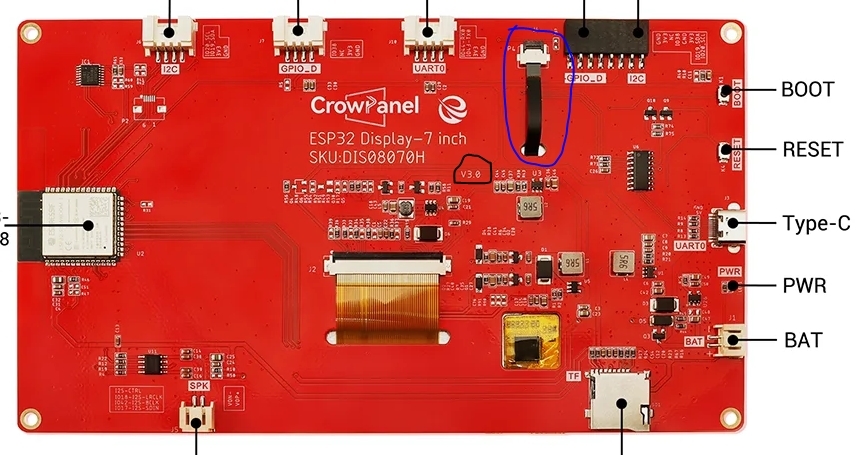
- Also, is your device without a case? Please check if the touch ribbon cable on the back of the device is properly connected and intact. You can also reconnect this ribbon cable. Please also send us a photo of the back of the board.
Here is how to reseat the ribbon connection:
a. Lift the black latch
b. Gently remove the ribbon cable from its socket
c. Examine the ribbon cable, latch, and socket for damage
d. Reinsert the ribbon cable firmly
e. Press down the black latch to lock it down
In the image below, the black circle indicates the hardware version, and the blue circle indicates the touch ribbon cable.[Photo]