

Crowview Note Windows 11, Touchpad, screen and speakers working, Keyboard unresponsive

Trying to hook up the CrowView Note to a GMKtec M5 Win 11 mini PC. The screen, sound, and touchpad work fine, but the keyboard itself doesn't generate keypresses and the fn keys don't appear to do anything. Win 11 is up to date. When the left USB A is connected, it is recognized as a HID Keybaord, but only the touchpad works. Upgrading the driver doesn't provide any other options than what it is already detected as, uninstalling that driver renders the touchpad inoperable until the USB A connector is removed and reinserted. Hooking up a second keyboard to the computer works fine. Fn key lock light is active during post, and then turns out as windows is starting. FN+Esc does not toggle the lock light, and none of the other FN shortcuts do anything. USB cable and connector on computer are blue (USB 3.0)
Comments
Dear Lantalia,
Thank you for reaching out to us and for your continued support.
We have received your messages, and our technical support team is reviewing the details. Please allow us some time to look into the matter. We will get back to you as soon as possible with an update.
In the meantime, pls check if you have provided the following information. if not, pls send to us, so that we can fix your problems faster.
pl tell us exactly which of our products you are using. We need to know the SKU No. . Or Please provide the purchase link for the product. so that we can continue to analyze the issue
Also, please provide the order number, product purchase link(if applicable), along with the name of the retailer, store, platform, or website where you purchased the product?
This allows us to work with the seller to provide you with better service.
We apologize for any inconvenience this may cause and appreciate your patience and understanding.
Best regards,
Dear Lantalia,
Aabout the use of the keyboard , pls refer to the following image:. pls try if it works.
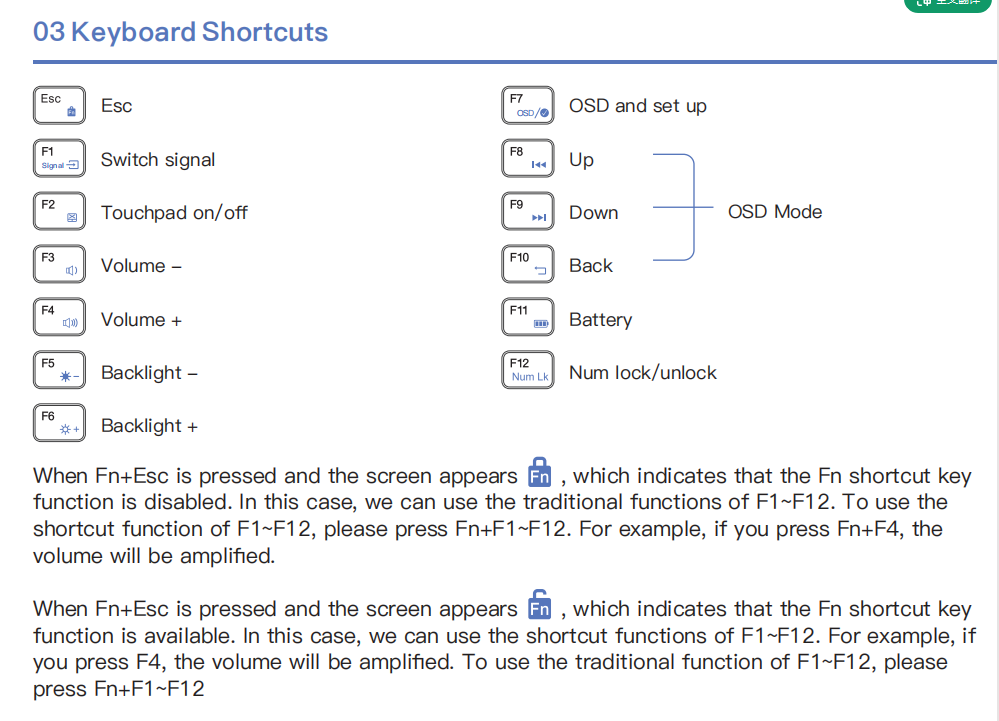
Interacted with support, likely a detached / damaged ribbon cable for the keyboard. Replacement arrived. Managed to open up the original and the battery had apparently shifted while taped to the keyboard ribbon cable, ripping it out of the zif. After reconnecting, keyboard mostly works, but isn't reliable. Replacement is working great though.
Only remaining question, is there a way to modify touchpad settings? Didn't see anything in the OSD. Win11 detects it as an HID compliant mouse, but I'm not seeing any option to switch to a touchpad specific driver (only options I could find were HID usb device, which didn't work, and the HID compliant mouse, which works, but doesn't give the option to adjust gestures). If there is a manufacturer specific driver for it, could you let me know? (either the Note or he touchpad the note uses, assuming it is one of the commodity pads).
If not, so be it, still bloody useful
Dear Lantalia,
Thank you for reaching out to us and for your continued support.
We have received your messages, and our technical support team is reviewing the details. Please allow us some time to look into the matter. We will get back to you as soon as possible with an update.
In the meantime, pls check if you have provided the following information. if not, pls send to us, so that we can fix your problems faster.
please provide the order number, product purchase link(if applicable), along with the name of the retailer, store, platform, or website where you purchased the product?
This allows us to work with the seller to provide you with better service.
We apologize for any inconvenience this may cause and appreciate your patience and understanding.
Best regards,
Dear Lantalia ,
I am sorry .
It's just a standard keyboard and touchpad; there are no other settings.
Best regards,