Other issues you reported: We are analyzing them as quickly as possible and will reply to you as soon as we have results. Please wait some time.
Thanks ,
@Marvin said:
No; I have not tried this with Meshtastic, as I no longer use Meshtastic.
I don't know of a way to apply this fix to a MeshCore Client node.
Dear Marvin ,
Thank you for the support to us .
Sorry, we don't have a repair method applicable to MeshCore. We suggest you contact the developers of MeshCore for assistance.
However, we recommend that you first try our solution on Meshtastic. If it works, it indicates that there is no problem with the hardware.
Thanks!
Warm regards,
UPDATE:
The only way that I have found to correct the problem with the GPS is to replace the tiny stock 9.5mm × 9.5mm GPS antenna with a larger 25mm × 25mm antenna. With the new antenna I now get a GPS lock in a few seconds, and the coordinates and altitude information is accurate. Unfortunately the larger antenna will not fit inside the case.
Previously; with the stock antenna, the GPS lock would take usually 20 minutes or more, or not at all. The coordinates and altitude information was not at all accurate.


Comments
Dear Marvin,
We sincerely apologize for the poor product experience.
Please view the following:
If so, please try this method:
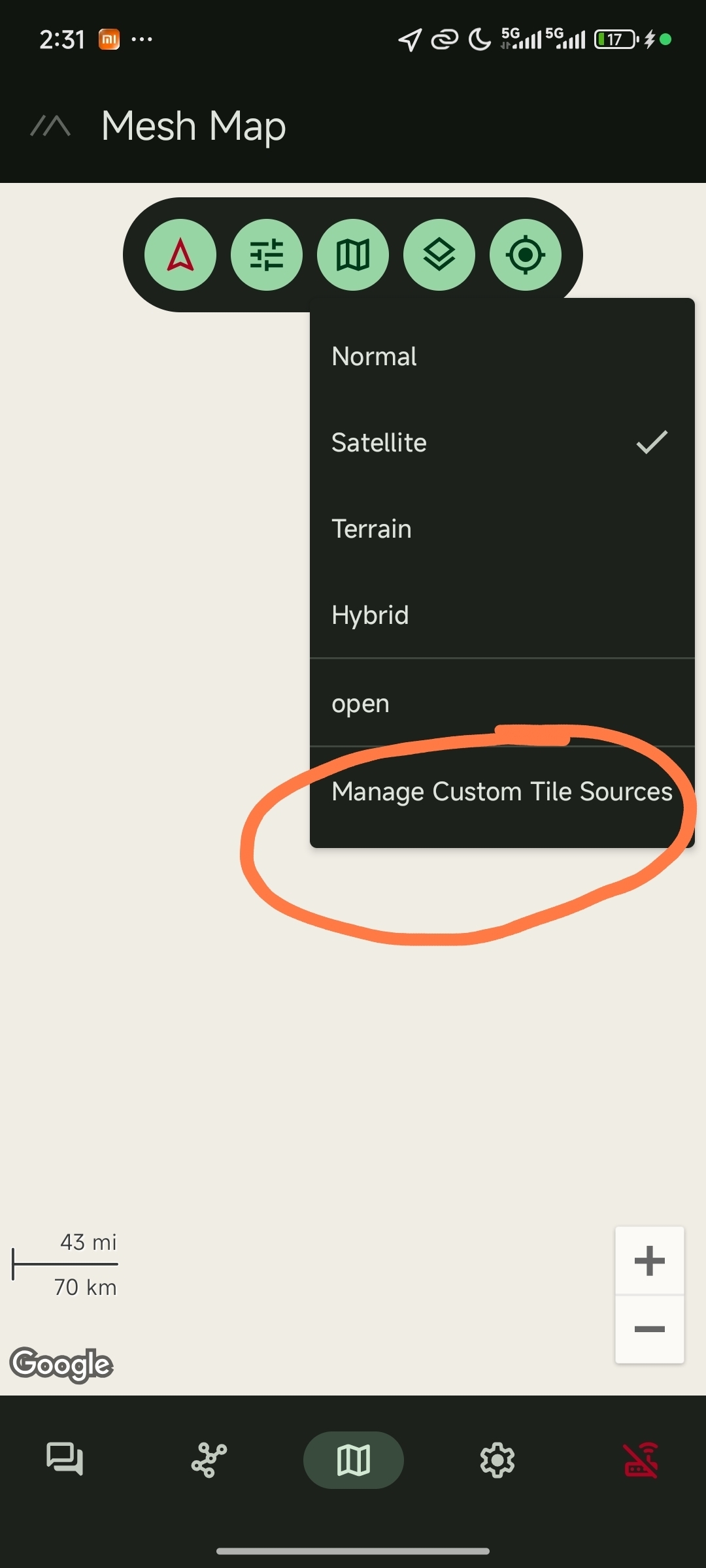
(This problem may be caused by different map formats.)
Please use the link below and follow the instructions in the images below. See if this resolves the issue.
https://{s}.tile.openstreetmap.org/{z}/{x}/{y}.png
Thanks ,
Warm regards,
Dear Marvin ,
May I ask if you have tried the method we provided in the last comment ? How was it? Did it work?
Thanks!
Best regards,
No; I have not tried this with Meshtastic, as I no longer use Meshtastic.
I don't know of a way to apply this fix to a MeshCore Client node.
Dear Marvin ,
Thank you for the support to us .
Sorry, we don't have a repair method applicable to MeshCore. We suggest you contact the developers of MeshCore for assistance.
However, we recommend that you first try our solution on Meshtastic. If it works, it indicates that there is no problem with the hardware.
Thanks!
Warm regards,
UPDATE:
The only way that I have found to correct the problem with the GPS is to replace the tiny stock 9.5mm × 9.5mm GPS antenna with a larger 25mm × 25mm antenna. With the new antenna I now get a GPS lock in a few seconds, and the coordinates and altitude information is accurate. Unfortunately the larger antenna will not fit inside the case.
Previously; with the stock antenna, the GPS lock would take usually 20 minutes or more, or not at all. The coordinates and altitude information was not at all accurate.