

How to Install Libraries manually in Arduino IDE?

Manual Installation
When you want to add a library manually, you need to download it as a ZIP file, expand it and put in the proper directory. The ZIP file contains all you need, including usage examples if the author has provided them. The library manager is designed to install this ZIP file automatically as explained in the former chapter, but there are cases where you may want to perform the installation process manually and put the library in the libraries folder of your sketchbook by yourself.
You can find or change the location of your sketchbook folder at File > Preferences > Sketchbook location.
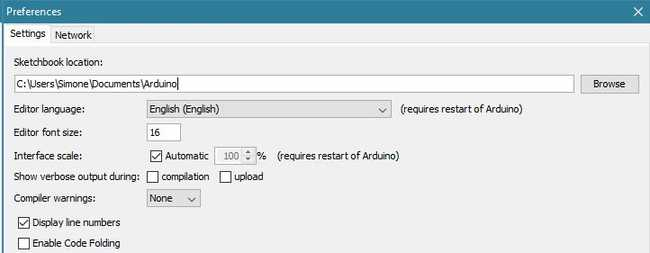
Sketchbook Prefs
Go to the directory where you have downloaded the ZIP file of the library
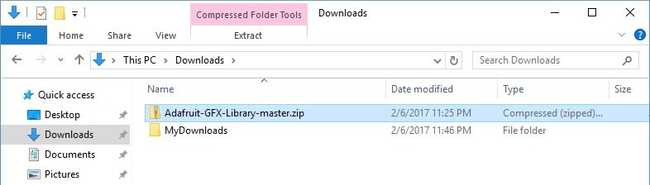
Lib ZIP 1
Extract the ZIP file with all its folder structure in a temporary folder, then select the main folder, that should have the library name
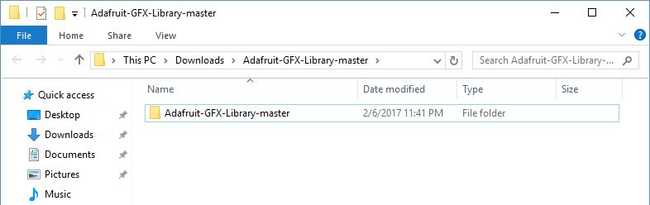
Lib ZIP 2
Copy it in the "libraries" folder inside your sketchbook.
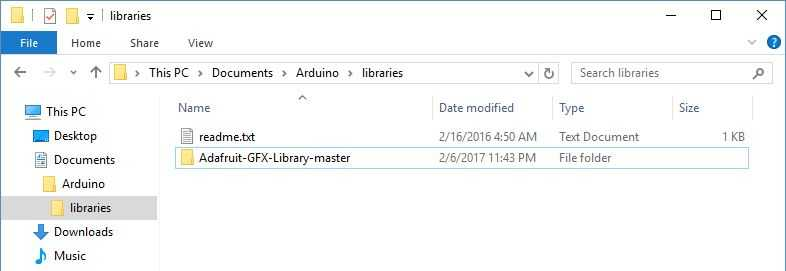
Lib ZIP 3
Start the Arduino Software (IDE), go to Sketch > Include Library. Verify that the library you just added is available in the list.
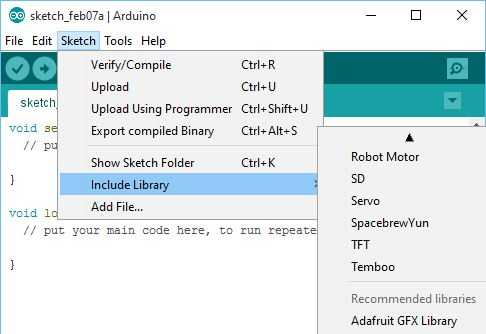
Lib ZIP 4
Please note: Arduino libraries are managed in three different places: inside the IDE installation folder, inside the core folder and in the libraries folder inside your sketchbook. The way libraries are chosen during compilation is designed to allow the update of libraries present in the distribution. This means that placing a library in the "libraries" folder in your sketchbook overrides the other libraries versions.
The same happens for the libraries present in additional cores installations. It is also important to note that the version of the library you put in your sketchbook may be lower than the one in the distribution or core folders, nevertheless it will be the one used during compilation. When you select a specific core for your board, the libraries present in the core's folder are used instead of the same libraries present in the IDE distribution folder.
Last, but not least important is the way the Arduino Software (IDE) upgrades itself: all the files in Programs/Arduino (or the folder where you installed the IDE) are deleted and a new folder is created with fresh content. This is why we recommend that you only install libraries to the sketchbook folder so they are not deleted during the Arduino IDE update process.
reference:
https://docs.arduino.cc/software/ide-v1/tutorials/installing-libraries/#manual-installation